Amazing Phone with Amazing Price Tag
MOTOROLA MOTO E LAUNCHED IN INDIA CARRYING A PRICE TAG OF RS. 6,999
HARD RESET MICROMAX A110 CANVAS 2
HOW TO HARD RESET MICROMAX A110 CANVAS 2 AND TROUBLESHOOT BY RAJNISH VERMA
MICROMAX UNITE 2 A106 REVIEW – THE MOTO E COMPETITOR?
The Unite 2 from Micromax (A106) is the first handset launched by Micromax that runs KitKat out of the box..
Wednesday, 30 April 2014
How to Hard Reset Micromax A110 Canvas 2 and Troubleshoot By RAJNISH VERMA
Wednesday, April 30, 2014
Rajnish verma
Micromax A110 Canvas 2 is
an amazing smartphone for the price around Rs. 10,000. It is one of the
best-selling smartphones last year. But some users are complaining
about minor issues. If you are also one of the those A110 users who are
facing problem with it, you can try a hard reset and see whether the
problem is solved or not. See below how to perform hard reset in
Micromax A110 Canvas 2.
Note: Backup your contacts and other important data before proceeding. Otherwise, you will lost your data stored in the smartphone.
Now you need to press Volume up (+), volume down (-) and power keys simultaneously until you get two options on the screen.

Now you will get Recovery mode and Factory mode options. To enter into the recovery more, press volume up (+) and to enter in factory reset mode press volume down (-) key.
To hard reset the phone, we need to enter in the recovery mode. Here use volume up and down keys to navigate. Press Menu button to select an option.
After factory reset, phone will reboot automatically.
In case you are facing any problem with the whole process, comment below.Download Video
Note: Backup your contacts and other important data before proceeding. Otherwise, you will lost your data stored in the smartphone.
Follow these steps
Switch off the phone.Now you need to press Volume up (+), volume down (-) and power keys simultaneously until you get two options on the screen.

Now you will get Recovery mode and Factory mode options. To enter into the recovery more, press volume up (+) and to enter in factory reset mode press volume down (-) key.
To hard reset the phone, we need to enter in the recovery mode. Here use volume up and down keys to navigate. Press Menu button to select an option.
After factory reset, phone will reboot automatically.
In case you are facing any problem with the whole process, comment below.Download Video
Tuesday, 29 April 2014
How to Transfer Music ,Videos etc in NOKIA LUMIA from any ANDROID Phone
Tuesday, April 29, 2014
Rajnish verma
from ANDROID
to windows phone
to windows phone
First of all you need a WINDOWS PHONE and a ANDROID phone.
1-Open portable wi-fi hotspot in ANDROID phone.
2-Turn wi-fi on in your WINDOWS PHONE and connect to ANDROID phone's wi-fi hotspot.
3-Download WI-FI FILE TRANSFER APP. in your Android phone from PLAY STORE.
4-Open WI-FI FILE TRANSFER APP in your Android phone and click START SERVICE.
5-Download GET THEM ALL APP. from store in your WINDOWS PHONE from STORE.
(if you are using a windows phone 8.1 then you don't need to download GET THEM ALL APP.)
6-Open GET THEM ALL APP. in your windows phone.
7-Just type the http address in it given by the WI-FI FILE TRANSFER APP.
(if you are using a windows phone 8.1 then type give address by
WI-FI FILE TRANSFER APP. in Internet Explorer )
8-now u will see a file list .Simply browse it and download anything from your ANDROID phone.
3-Download WI-FI FILE TRANSFER APP. in your Android phone from PLAY STORE.
4-Open WI-FI FILE TRANSFER APP in your Android phone and click START SERVICE.
5-Download GET THEM ALL APP. from store in your WINDOWS PHONE from STORE.
(if you are using a windows phone 8.1 then you don't need to download GET THEM ALL APP.)
6-Open GET THEM ALL APP. in your windows phone.
7-Just type the http address in it given by the WI-FI FILE TRANSFER APP.
(if you are using a windows phone 8.1 then type give address by
WI-FI FILE TRANSFER APP. in Internet Explorer )
8-now u will see a file list .Simply browse it and download anything from your ANDROID phone.
Monday, 28 April 2014
Windows Phone 8.1 is official, here are the new features
Monday, April 28, 2014
Rajnish verma
Microsoft officially unveiled the latest revision of its mobile
platform - Windows Phone 8.1. The new release brings a lot of new
features and improvements to the OS. Most of those you already know from
the numerous leaks through the pre-release SDK, but here's the full
list.

Windows Phone 8.1 brings its own virtual personal assistant called Cortana. With Android having Google Now and Apple boasting Siri, it was about time Microsoft also joined the native personal assistant to Windows Phone.
The Bing-powered Cortana plays an important role in WP 8.1 letting you set reminders, calendar events, call people, give you information about places you have or plan to visit. She also knows sports, gives weather info and basically everything you would expect from a virtual assistant. She’s going to be accessible through the Search key and features advanced voice recognition. This allows you to ask Cortana to search the web as well.

Cortana is also able to feed you custom notifications based on your personal information and usage data, should you allow it, much like Google Now. At launch, Bing and Foursquare are going to be feeding Cortana with information for places and events, but more online services will follow soon.
Joe Belfiore confirmed Cortana will be available in the US at first with the UK and China second. Other countries will follow later on.


Joe Belfiore demonstrated a bunch of cool lockscreens, which displayed custom calendar entries with nice designs.
The other great customization feature is the option to set up custom backgrounds for the Start screen tiles. Small, but totally needed feature to make Windows Phone truly personal.
Another UI change means that you will now be able to select whether to have a third live tile column on the Start screen. Previously, this was set only by the phone manufacturer, so it's cool Microsoft lets the user make this decision in WP 8.1.
There’s also an InPrivate mode enabling incognito browsing. It doesn’t make you invisible on the web, but rather disable history storing and cookie information is deleted once an incognito tab is closed.
Users are now able to upload files through IE 11, with the browser also supporting WebGL and YouTube’s HTML5 video player.

Data and Wi-Fi Sense will give you greater control over how you use your network. Wi-Fi Sense is a cool new addition that gives you the ability to share the internet connectivity of your secured Wi-Fi networks with your Skype, Facebook and Outlook contacts without having to give the password. It also allows you to find and connect to free open Wi-Fi networks automatically.
Just as a couple leaked screenshots suggested earlier, Windows Phone 8.1 now features on-screen software keys – Search, Start and Back. This means the requirement for hardware keys below the screen is a thing of the past
Quiet hours
Now in Windows Phone 8.1 you can set any period of the day when you want only a certain group of people to be able to reach you. This feature is called Quiet hours and is accessible from the Settings.
Wordflow Keyboard
A new option in the Windows Phone 8.1 keyboard is called Wordflow - a Swype-like input method allowing you to quickly input words by swiping through the letters. Joe Belfiore says it's so good that in fact it has set the new Guinness World Record for fastest writing on a smartphone, dethroning the Galaxy S4.

And if you are registered Microsoft developer, you will be able to get an early glimpse on the update as early as April 10.

Cortana – Windows Phone’s personal virtual assistant

Windows Phone 8.1 brings its own virtual personal assistant called Cortana. With Android having Google Now and Apple boasting Siri, it was about time Microsoft also joined the native personal assistant to Windows Phone.
The Bing-powered Cortana plays an important role in WP 8.1 letting you set reminders, calendar events, call people, give you information about places you have or plan to visit. She also knows sports, gives weather info and basically everything you would expect from a virtual assistant. She’s going to be accessible through the Search key and features advanced voice recognition. This allows you to ask Cortana to search the web as well.
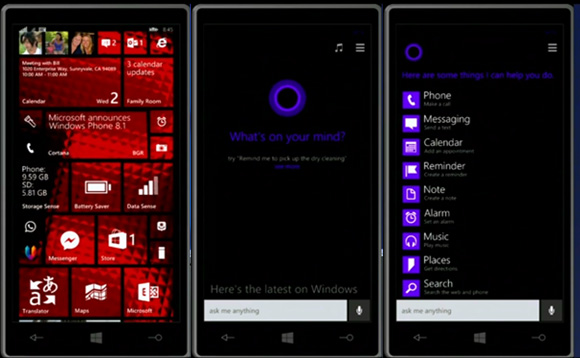
Cortana is also able to feed you custom notifications based on your personal information and usage data, should you allow it, much like Google Now. At launch, Bing and Foursquare are going to be feeding Cortana with information for places and events, but more online services will follow soon.
Joe Belfiore confirmed Cortana will be available in the US at first with the UK and China second. Other countries will follow later on.
Action Center
Windows Phone 8.1 finally gets a dedicated notification center called Action Center. It holds customizable quick setting toggles, which include brightness adjustment, location settings, rotation locks, Wi-Fi and Bluetooth on and off among others. Below that you get a notification drawer with a full list of ongoing notifications such as email, text messages, missed calls and even notifications from Cortana.
Updated lockscreen and custom tile backgrounds
Thanks to new open APIs, Windows Phone 8.1 allows applications to take control over the lockscreen and change the theme or alter its functionality altogether.
Joe Belfiore demonstrated a bunch of cool lockscreens, which displayed custom calendar entries with nice designs.
The other great customization feature is the option to set up custom backgrounds for the Start screen tiles. Small, but totally needed feature to make Windows Phone truly personal.
Another UI change means that you will now be able to select whether to have a third live tile column on the Start screen. Previously, this was set only by the phone manufacturer, so it's cool Microsoft lets the user make this decision in WP 8.1.
Internet Explorer 11
Windows Phone 8.1 ships with the latest version of Internet Explorer. IE 11 brings reading view, which grabs websites and extracts their text for easier reading. It also comes with a tuned up password manager, which will sync your passwords across multiple devices.There’s also an InPrivate mode enabling incognito browsing. It doesn’t make you invisible on the web, but rather disable history storing and cookie information is deleted once an incognito tab is closed.
Users are now able to upload files through IE 11, with the browser also supporting WebGL and YouTube’s HTML5 video player.
Enterprise and security
The latest instalment of Windows Phone comes with VPN support. Now, you can punch in your VPN settings into the phone and surf the way more securely. WP 8.1 also supports S/MIME, which allows you sign and encrypt your email.Sense apps
Microsoft hasn’t forgotten about its Sense apps and has added a few cool features to them. Battery Power Sense is the familiar app that tracks what software uses the phone’s resources most and gives you a handy overview of how your phone’s battery gets drained. Naturally, you can do something about it thanks to the Battery Saver option, which has app exclusion list.
Data and Wi-Fi Sense will give you greater control over how you use your network. Wi-Fi Sense is a cool new addition that gives you the ability to share the internet connectivity of your secured Wi-Fi networks with your Skype, Facebook and Outlook contacts without having to give the password. It also allows you to find and connect to free open Wi-Fi networks automatically.
Misc features
On-screen keysJust as a couple leaked screenshots suggested earlier, Windows Phone 8.1 now features on-screen software keys – Search, Start and Back. This means the requirement for hardware keys below the screen is a thing of the past
Quiet hours
Now in Windows Phone 8.1 you can set any period of the day when you want only a certain group of people to be able to reach you. This feature is called Quiet hours and is accessible from the Settings.
Wordflow Keyboard
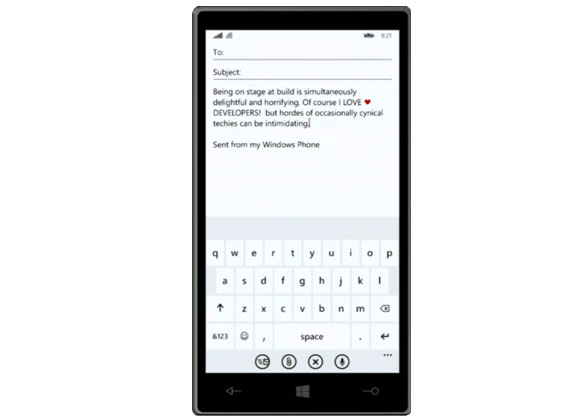
A new option in the Windows Phone 8.1 keyboard is called Wordflow - a Swype-like input method allowing you to quickly input words by swiping through the letters. Joe Belfiore says it's so good that in fact it has set the new Guinness World Record for fastest writing on a smartphone, dethroning the Galaxy S4.
Availability
The Windows Phone 8.1 update will be officially released in a few months (that's as specific as Microsoft got), while new devices running it will start shipping in late April/early May. It's not specified which WP8 handsets will be treated to the update at this point, but we guess the list will be quite extensive.And if you are registered Microsoft developer, you will be able to get an early glimpse on the update as early as April 10.
HOW TO HARD RESET NOKIA LUMIA 520 525 620 625 630 720 710 810 820 ETC.
Monday, April 28, 2014
Rajnish verma
Nokia Lumia 520 soft reset
If nothing helps as a last resort you can reset clear your Nokia Lumia 520 RM-914 forgotten password by using hardware reset:
Nokia Lumia 520 hard reset Windows Phone 7
1. Turn off your Lumia 520 phone.2. Press and hold the Volume down and Camera keys.
3. Press and hold the Power key.
4. When you feel the phone vibrates, release the power key, but keep pressing the volume down and camera keys, until the phone reboots. All data will be lost!

Nokia Lumia 520 hard reset Windows Phone 8
1. Turn the power Off.2. Press and hold the Volume down and connect the charger or the USB cable with PC, for about 8 seconds, you will see an exclamation mark (!) on the screen. Note: If you do not press any of the following keys, then the phone wp8 will starts boot normally.
Then press the keys in this exact order:
1. Volume up
2. Volume down
3. Power
4. Volume down

The phone will reset and restart. Please note this may take a few minutes.
All data will be lost!
Factory Reset Nokia Lumia 520 from the menu
On the start screen Scroll down to the bottom of the screen. Tap the arrow icon.- On the Start screen, tap
. - Tap Settings > about phone.
- Tap reset your phone, and then tap yes and again yes.


